- May 20, 2024
Best Cameras, Photography Gear, and Editing Software for Amazing Before & After Photos in 2024
- John Zannis, MD
- 0 comments
Before and after photos are extremely important in documenting treatments, but also in marketing your services and showcasing your excellent results. In order to do that well, the photos must be high quality and consistently edited for clarity. But, you don't need a professional photography studio or bank-breaking equipment to do so.
Here are some recommendations for quality photography equipment (I am not sponsored nor profit from these recommendations in any way) that offers excellent value for money, as well as specific editing software applications to enhance your before and after photos:
Photography Equipment:
-
Camera:
-
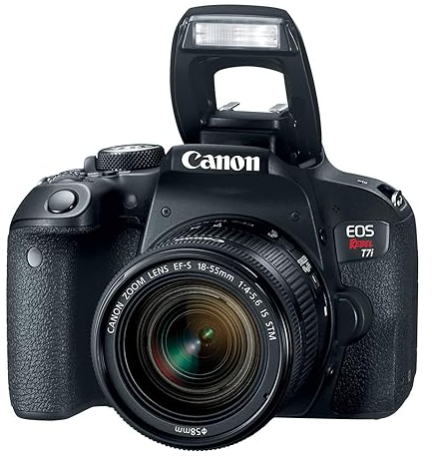
Canon EOS Rebel T7i (also known as Canon EOS 800D): This DSLR camera offers excellent image quality, fast autofocus performance, and intuitive controls, making it well-suited for capturing detailed before and after photos. Its 24.2-megapixel sensor and DIGIC 7 image processor produce sharp, high-resolution images with accurate colors.
Nikon D5600: Another solid option in the entry-level DSLR category, the Nikon D5600 features a 24.2-megapixel sensor, a tilting touchscreen LCD, and built-in Wi-Fi and Bluetooth connectivity for easy sharing of photos. It offers excellent image quality and versatility for capturing a wide range of subjects.
-
-
Lens:
Canon EF-S 18-55mm f/3.5-5.6 IS STM: This kit lens provides versatile focal lengths for capturing both wide-angle and portrait shots, making it suitable for before and after photography. Its built-in image stabilization helps reduce camera shake, resulting in sharper images.
Nikon AF-S DX NIKKOR 18-55mm f/3.5-5.6G VR II: Similar to the Canon kit lens, this Nikon lens offers a versatile zoom range and built-in Vibration Reduction (VR) technology to minimize blur caused by camera shake. It's a budget-friendly option for capturing a variety of subjects.
-
Tripod:
AmazonBasics 60-Inch Lightweight Tripod: This affordable tripod offers sturdy support for your camera and provides adjustable height and tilt angles for capturing consistent before and after shots. Its lightweight design makes it easy to transport and set up in different shooting environments.
-
Lighting:
Neewer 2-Pack Bi-color Dimmable LED Video Lights: These LED lights provide adjustable color temperature and brightness levels, allowing you to customize the lighting setup for your before and after photo shoots. With a lightweight and portable design, they're suitable for both indoor and outdoor use.
Editing Software Applications:
Adobe Photoshop: Adobe Photoshop is a versatile and powerful image editing software used by professionals worldwide. With advanced editing tools and features such as layers, masks, and filters, Photoshop allows you to retouch, enhance, and manipulate your before and after photos with precision and control. While Photoshop requires a subscription fee, it offers unmatched flexibility and capabilities for creating stunning images.
Adobe Lightroom: Adobe Lightroom is a comprehensive photo editing and organization software that offers a user-friendly interface and intuitive editing tools. Lightroom's non-destructive editing workflow allows you to make adjustments to your before and after photos without altering the original image files, making it ideal for batch editing and color grading. It also integrates seamlessly with Photoshop for advanced retouching and compositing.
GIMP (GNU Image Manipulation Program): GIMP is a free and open-source image editing software that offers a wide range of features and capabilities comparable to Adobe Photoshop. With tools for retouching, color correction, and image manipulation, GIMP provides a cost-effective alternative for editing before and after photos. While it may not have all the advanced features of Photoshop, GIMP is a powerful option for photographers on a budget.
-
Canva: Canva is a web-based graphic design platform that offers a variety of tools and templates for creating professional-looking before and after images. With drag-and-drop functionality and pre-designed layouts, Canva allows you to easily add text, graphics, and effects to your photos to enhance their visual appeal. While Canva's editing capabilities may be more limited compared to dedicated photo editing software, it's a convenient option for creating eye-catching before and after collages and presentations.

By investing in quality photography equipment and leveraging editing software applications, you can capture and create stunning before and after photos that showcase the transformative results of your cosmetic surgery and aesthetic treatments. Whether you opt for DSLR cameras, versatile lenses, affordable tripods, or professional editing software, choosing the right tools and software for your needs will help you achieve exceptional results and elevate your practice's visual branding.

John Zannis, MD
Dr. Zannis is an award-winning plastic surgeon, author, serial entrepreneur and modern Renaizzance man. His free content on YouTube and the podcast Beautycallz with Dr. Z has been viewed or downloaded hundreds of thousands of times.
One of his greatest passions is sharing the extensive business expertise he has acquired after building several multi-million dollar businesses. He believes in serving others and helping his audience live an extraordinary life!
Learn more: www.zannis.com